
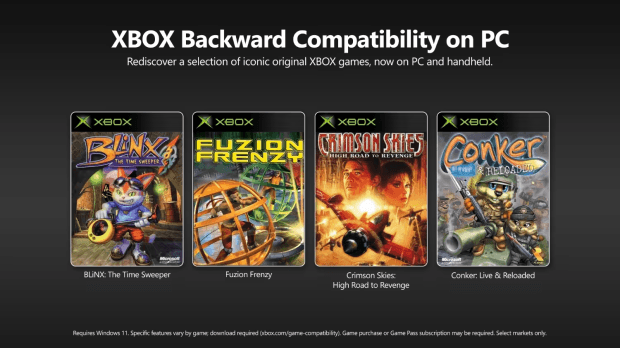

Microsoft has launched Xbox Backward Compatibility on PC with four original Xbox games, while dataminers say the tech points toward a wider PC Xbox game library future. Here is what is confirmed, what is reported, and where expectations should stay grounded.
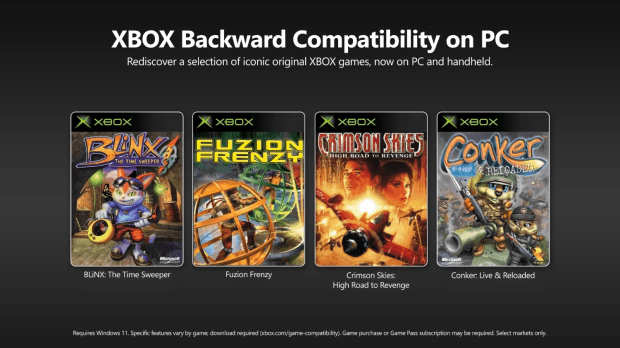
Image: tweaktown.com
Microsoft’s PC back-compat launch is real, but the bigger Xefu story is still developing
Microsoft has officially started Xbox Backward Compatibility on PC, launching the program in early release with a small set of original Xbox games playable through the Xbox app on Windows PCs and supported handhelds. The tension is immediate: Microsoft is presenting this as the start of a broader preservation push, while dataminers and emulator researchers are already pointing to technology that could make Xbox 360 games portable to PC later.
On Xbox Wire, Microsoft said the program begins with classic original Xbox titles on PC and handheld devices, including the ROG Xbox Ally and Xbox Ally X, in supported regions. Microsoft’s post names BLiNX: The Time Sweeper, Conker: Live and Reloaded, and Crimson Skies: High Road to Revenge in the visible source text, while Digital Foundry, Kotaku, and PCGamesN all report the four-game launch also includes Fuzion Frenzy. Those same outlets identify the launch set as BLiNX, Conker, Crimson Skies, and Fuzion Frenzy.
The official part is narrow but important. These games are available to purchase on PC, are included with Xbox Game Pass according to Microsoft’s announcement, and digital console licenses for the same games carry over to PC or handheld. Microsoft frames that license carryover through Xbox Play Anywhere and Xbox Cloud Gaming, saying the games can now move across Xbox console, cloud, PC, and handheld.
The unannounced part is the Microsoft Xefu discussion. Kotaku and TweakTown report, citing dataminer Lunarixus and the XWine1 project, that Microsoft’s PC backward compatibility work appears to use Xbox 360-era emulation technology, specifically Xefu, the original Xbox emulator used on Xbox 360 hardware. Microsoft’s Xbox Wire post does not confirm Xefu, Xbox 360 support on PC, or a timeline for Xbox 360 titles. That distinction is the story: the doorway is open, the hallway is visible, but Microsoft has only invited players into the first room.
In plain terms, Xefu sounds like an emulator nested inside a PC wrapper
The cleanest way to understand the reported Xefu setup is to think of Microsoft’s PC app as running a backward compatibility stack rather than a hand-built PC port for each individual game. Kotaku describes the discovery as an emulator inside an emulator: an Xbox 360 emulator environment on PC running Xefu, the emulator that Xbox 360 hardware used for original Xbox games.
TweakTown similarly reports that Microsoft is bringing original Xbox games to PC by running the Xbox 360’s Xenon Fusion, or XeFu, emulator inside an Xbox 360 environment on Windows. That is a reported technical reading from dataminers and emulator projects, not an architecture breakdown Microsoft has publicly laid out in the provided Xbox Wire announcement.
The practical implication is easy to grasp. If Microsoft can make one compatibility layer behave reliably on Windows, more games can potentially become portable without every title needing a bespoke remaster. That is especially attractive for older console libraries where the craft still holds up but the access path has narrowed. A game like BLiNX is a charmingly odd early-2000s platformer because of its time-control ideas and chunky mascot-era level design, but it has never had the easy PC afterlife that many indies and platformers now take for granted.
That does not mean the entire original Xbox or Xbox 360 catalog is suddenly headed to your desktop. Backward compatibility is part engineering, part licensing, part storefront work, and part quality assurance. The reported Xefu setup may explain how Microsoft can run these games, but it does not answer which publishers will approve releases, which games will pass testing, or whether features like achievements will be ready on day one.
The launch library is small, strange, and useful as a test case
The first Xbox PC backwards compatibility wave is modest: BLiNX: The Time Sweeper, Conker: Live and Reloaded, Crimson Skies: High Road to Revenge, and Fuzion Frenzy, according to Digital Foundry, Kotaku, and PCGamesN. As a discovery shelf, it is an uneven but revealing sample. There is a Rare remake with Conker, a first-party platformer in BLiNX, an aerial combat cult favorite in Crimson Skies, and a multiplayer party game in Fuzion Frenzy.
PCGamesN’s Shaun Walton argues in an opinion piece that Microsoft “chose the wrong ones,” pointing to absent fan-bait names such as Genma Onimusha, The Simpsons: Hit & Run, Unreal Championship, OutRun 2, Jade Empire, and Star Wars: Knights of the Old Republic. That is commentary, not a Microsoft roadmap, but it captures the obvious player reaction: a back-compat program is judged as much by what is missing as by what arrives.
There is a business reason to start small. A compatibility platform needs safe test cases before it can carry the weight of the games people will get loud about. Crimson Skies has a loyal audience, Conker carries Rare nostalgia, and BLiNX gives Microsoft a platformer with a very specific input and camera feel to validate. Fuzion Frenzy, meanwhile, tests a different kind of old-console appeal: local-party pacing and simple readability rather than big adventure structure.
Still, the current list also shows why expectations should stay grounded. The original Xbox catalog is full of games tangled in licensed music, defunct publishing relationships, expired likeness rights, and sequels now owned or managed by different corporate structures. Microsoft can build a stronger PC Xbox game library pipeline, but it cannot turn every beloved disc on your shelf into a clean PC entitlement overnight.
Your library may become more portable, but only under Microsoft’s supported rules
The strongest confirmed player-facing feature is license portability. Microsoft says that if players already own a digital license for these supported original Xbox games on console, that license now carries over to PC or handheld. For anyone with a long Xbox account history, that is the most meaningful piece of the Xbox Play Anywhere future Microsoft is sketching here.
This is not the same as saying every old Xbox purchase now works on PC. It applies to the supported backward compatible titles Microsoft has enabled. It also depends on digital ownership, supported regions, the Xbox on PC app, and Windows 11 hardware that meets Microsoft’s requirements. Physical disc ownership is not described in the provided Xbox Wire material as a path to PC access.
Microsoft says the games are also included with all Xbox Game Pass plans and available for purchase on PC. That creates three practical routes for players: existing digital owners can try the carryover, subscribers can access the launch titles through Game Pass, and everyone else can buy supported games individually. The sources provided do not list PC prices, so players should check the Xbox store page in their region before assuming parity with older console listings.
For handheld players, the pitch is especially clear. Microsoft names PC handhelds including the ROG Xbox Ally and Xbox Ally X, and the minimum specs suggest the company wants this to run below high-end desktop territory. That matters for older platformers and action games. The appeal of a 2002 mascot platformer or a quick Fuzion Frenzy session changes when it can live on a handheld instead of being tied to a living-room console.
Performance is promising, but Digital Foundry found early-release rough edges
Microsoft’s official feature list is solid for a first public pass. Xbox Wire says these PC releases include graphics settings such as up to 4x resolution upscaling, VSync support, fullscreen and windowed modes, anisotropic filtering, enhanced anti-aliasing, and customizable language and audio settings. Digital Foundry’s hands-on adds that the PC app offers 2x, 3x, and 4x resolution scaling up to 2560x1920, while keeping the games in a 4:3 aspect ratio rather than adding widescreen support.
The frame-rate story is conservative. Digital Foundry reports that three of the four games retain their original 30fps limits, while Fuzion Frenzy remains the 60fps exception. The outlet says the PC results are a good match for Xbox Series X emulation in terms of textures, shadows, and effects, but it also found issues serious enough to consult Microsoft before publishing video coverage.
Those early-release problems are worth taking seriously. Digital Foundry reports sub-par frame pacing in the 30fps titles, which can make camera motion look jerky, and notes that this problem is not present on Xbox consoles. It also found a Windows display-scaling bug where a 2560x1920 setting could render at 1440x1080 when Windows was set to 150 percent scaling, with 100 percent scaling fixing the issue. The outlet also cites weaker anisotropic filtering than Series X, wireframes visible in Fuzion Frenzy, shadow artifacts in BLiNX, and motion judder in Conker.
There is one PC-side win in Digital Foundry’s testing: Conker presents in a correct 4:3 aspect ratio on PC, while the outlet says the Series X back-compat version shows a narrower view. That kind of detail is exactly why this rollout needs patient testing instead of victory laps. Old games are delicate machines. A platformer’s jump timing, camera cadence, and texture clarity can feel newly sharp at higher resolution, or oddly off if pacing and scaling are wrong.
The Xbox 360 clue is exciting, but it is not an Xbox 360 launch announcement
The biggest reported implication of Microsoft Xefu is Xbox 360 compatibility on PC. Kotaku reports that Lunarixus concluded the findings “probably” confirm Xbox 360 games will also be backward compatible in the future, and that XWine1 has run dumped backward-compatible Xbox 360 and original Xbox games using Microsoft’s emulator components “with varying degrees of success.” Kotaku treats that as evidence the emulator can run Xbox 360 games, even though Microsoft has only released original Xbox titles through the official PC program.
That phrase, “with varying degrees of success,” should do a lot of work for readers. Unofficial experimentation can reveal capability, but it does not equal a supported product. A game booting or partially running outside the official storefront does not prove it will pass Microsoft’s certification, receive cloud save support, gain achievements, or become legally available for purchase.
The desire is obvious. Kotaku names Lost Odyssey and Blue Dragon as Xbox 360-era games that are not officially available on other platforms, and mentions Fable 2 as a title many players would like to see more widely playable before Playground Games’ Fable reboot. Those are examples of audience demand, not announced PC releases. Microsoft has not provided a list of Xbox 360 games for PC backward compatibility in the supplied source material.
For now, the safest read is this: Microsoft has launched Xbox backwards compatibility PC support for original Xbox games, and independent technical reporting suggests the underlying work could support a larger library later. The word “could” matters. The Xbox Play Anywhere future gets much more compelling if Xbox, PC, cloud, and handheld libraries start to behave like one account-based collection, but the current public program remains an early release with four original Xbox games.
Should you try it now or wait for the compatibility layer to mature?
If you already own one of the supported games digitally or subscribe to Game Pass, there is little downside in sampling the program now, provided your PC meets the requirements. Microsoft lists Windows 11, 8GB of RAM, 4GB of video memory, a GPU such as a Nvidia GTX 950, AMD Radeon RX 550, or Intel Arc A310, and a four-core, eight-thread CPU such as an Intel Core i3-10300, AMD Ryzen 3 3100, or AMD Ryzen Z2 A as minimum requirements. Recommended specs include 16GB of RAM, 8GB of video memory, a Radeon RX 6800S, Nvidia GTX 1070 Ti, or Intel Arc A770, and a six-core, twelve-thread CPU such as an Intel Core i5-10400, Ryzen 5 3600, or Ryzen AI Z2 Extreme.
If you are buying in specifically for achievements, wait. Microsoft says achievements are coming later this year to select original Xbox games on console and PC, and that the first four early-release games will be updated with achievements in the coming months. They are not part of the launch experience described by Microsoft and criticized by PCGamesN.
If you are sensitive to frame pacing, also consider waiting for patches or checking fresh technical analysis after updates. Digital Foundry’s early findings suggest the PC versions are already close to the console back-compat presentation in many respects, but the current issues are exactly the sort of small technical scratches that can bother players revisiting old action games and platformers.
The hopeful version of this story is easy to love: a future where the PC Xbox game library is less fragmented, where old console purchases travel with you, and where compact handheld sessions make forgotten curiosities easier to rediscover. The grounded version is the one players should act on today: four original Xbox games are live in early release, Microsoft promises more features, dataminers see signs of a deeper Xefu-based compatibility path, and the Xbox 360 dream remains unannounced until Microsoft says otherwise.