
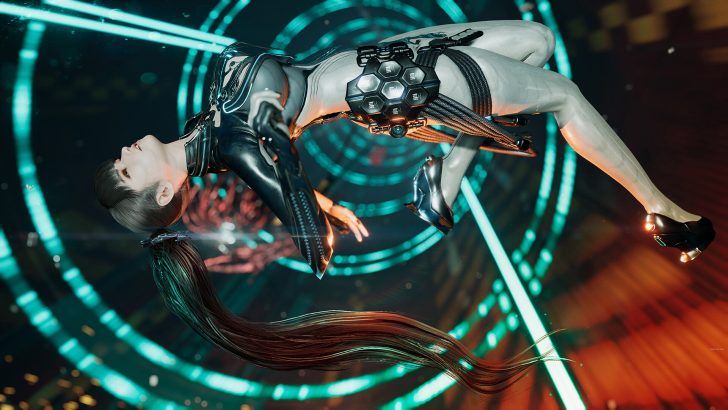
Shift Up will let Stellar Blade players disable frame generation on Switch 2 at launch. Here is what is confirmed, what remains unclear, and what buyers should test first.
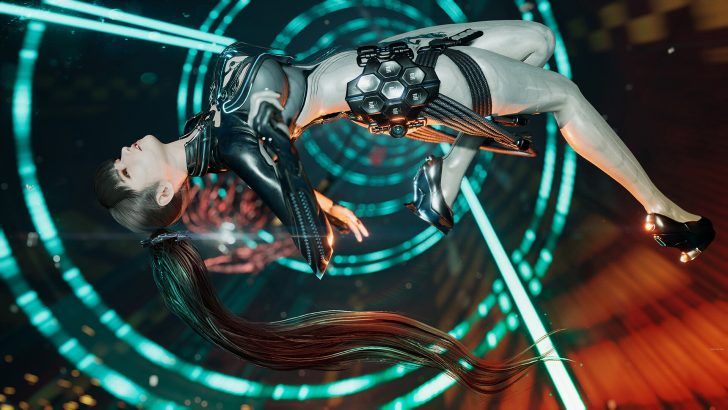
Image: wccftech.com
Shift Up is adding a launch toggle after demo feedback
Shift Up says Stellar Blade Complete Edition will include a frame generation toggle when it launches on Nintendo Switch 2, giving players the option to turn the feature on or off after complaints around the demo’s feel and responsiveness.
The studio confirmed the change through the official Stellar Blade account on X, writing that it had been watching feedback on the Switch 2 demo and had decided to add a Frame Generation toggle at release. Nintendo Everything, My Nintendo News, Vice, Twisted Voxel, and Noisy Pixel all cited that public statement in their coverage of the change.
The immediate tension is clear: Stellar Blade is being positioned on Switch 2 around a 60 frames-per-second presentation, but the demo has led some players and outlets to question whether the path to that target comes with too much input latency for a game built around parries, dodges, boss pressure, and close-range sword timing. The new setting gives buyers a choice, but it also turns launch day into a performance test.
The graphics setting at the center of the Switch 2 port
Frame generation is designed to create additional frames between rendered frames, producing a smoother-looking image than the base frame rate would suggest. Noisy Pixel described the process as using data to produce predicted frames between real frames, while Twisted Voxel reported that the Switch 2 version uses DLSS for image upscaling alongside AMD FSR 3.1 frame generation to output a 60 FPS presentation.
According to My Nintendo News, an earlier report said Shift Up was targeting 60 FPS on Switch 2 in both handheld and docked play, with upscaled 720p in handheld mode and upscaled 1080p while docked. That target is the promise frame generation is trying to support: a portable version of Stellar Blade that looks fluid on Nintendo’s new hardware.
The tradeoff is that the smoothness players see is not the same thing as the speed at which the game accepts and reflects inputs. Nintendo Everything noted that turning frame generation off could reduce input lag and visual artifacts, but the frame rate would be lower. That is the core choice Shift Up is now putting into the full release: smoother motion with generated frames, or a potentially cleaner and more responsive feel at a lower frame rate.
Why latency worries players in Stellar Blade specifically
This concern lands harder here than it would in a slower adventure game. Stellar Blade’s official description, quoted by Nintendo Everything, frames its combat around fast, stylish action, fluid attack combos, unlockable abilities, weapon upgrades, and boss encounters that test both reflexes and strategy. In that kind of action game, timing is not decoration. It is the language the player uses to survive.
Nintendo Life’s opinion piece on the Switch 2 demo described a disappointing first impression, with the writer struggling to land parries and comparing the feel to playing on a television without game mode enabled. The same piece said some of that heaviness might be specific to the Switch 2 port because of FSR frame generation, while also noting that Stellar Blade director Kim Hyung-tae had previously discussed deliberate input delay tied to the game’s animation style on another platform.
That distinction matters. Player complaints about the demo do not prove that frame generation is the only source of latency. Stellar Blade already has a particular weight to its animation and input timing, according to the director comment referenced by Nintendo Life. Frame generation may be adding to a feel some players already find heavy, or it may be exposing that feel more sharply on Switch 2. Shift Up’s toggle will let players compare those possibilities directly.
The confirmed facts and the unresolved performance questions
The confirmed part is narrow but important: Shift Up says the full Switch 2 release will have a Frame Generation toggle at launch. The current demo, according to Vice, has frame generation on by default and does not let players turn it off. The launch version is expected to change that.
The less certain part is what the game will look and feel like once the setting is disabled. Nintendo Everything says the frame rate will be lower if frame generation is off. Twisted Voxel states that disabling the feature will allow play at the game’s native 30 FPS output. Vice is more cautious, noting that Shift Up has not yet detailed exactly how the game will perform with frame generation turned off and saying it would not call it a locked 30 FPS mode yet.
Those reports do not fully conflict on the broad direction, since all point toward a lower frame rate without generated frames. The open question is stability and presentation. A lower native output can still be acceptable for some action games if frame pacing is steady and input response is predictable. It can also feel rough if drops, uneven pacing, or visual compromises interrupt the rhythm. Shift Up has not provided a full technical breakdown in the supplied source material.
How the Switch 2 port is being packaged
Stellar Blade Complete Edition is scheduled for Nintendo Switch 2 on November 5, 2026, according to Twisted Voxel and Noisy Pixel. Noisy Pixel notes that Stellar Blade Complete Edition is already available on PlayStation 5 and PC through Steam and the Epic Games Store.
The Switch 2 release is also being sold as a complete package rather than a bare port. Twisted Voxel reports that the release includes post-launch content, crossover cosmetics, expansions, and platform-specific features such as HD Rumble, gyro aiming, and Joy-Con 2 motion controls for activities including fishing. Noisy Pixel similarly says the Switch 2 version will include all DLC.
That content pitch gives the port real appeal for players who waited, especially anyone who wants Stellar Blade in a portable format. The performance question remains the gatekeeper. A complete edition only helps if the combat loop holds together, because this is a game where the cinematic sweep of ruined Earth eventually funnels into a blade clash, a dodge window, and the split-second read of an enemy attack.
What buyers should check when the port launches
The first launch-day check is simple: open the graphics or performance settings and confirm the frame generation toggle is present. Shift Up has promised it for release, but the demo does not include the option, according to Vice, so the full version should be treated as the real test case.
Players sensitive to input lag should compare the same encounter with frame generation on and off. Focus on parry timing, perfect dodges, camera movement, and how quickly EVE responds after an attack input. If frame generation is enabled, watch for the smoother 60 FPS presentation that the Switch 2 version is targeting. If it is disabled, watch whether the lower frame rate feels steadier and more predictable, even if motion looks less fluid.
Visual checks also matter. Nintendo Everything mentioned possible graphical issues such as excess artifacts when frame generation is active, and Vice reported that some players had raised concerns about EVE’s hair in the Switch 2 version. Those details may not matter to every buyer, but they are part of the port’s presentation, especially in a game that leans so heavily on stylish character animation, set-piece framing, and high-contrast sci-fi environments.
For cautious buyers, the smartest move is to wait for launch footage or hands-on impressions using the final build with the toggle active. For players who prioritize responsiveness over visual smoothness, the new Stellar Blade launch settings could make the Switch 2 port far easier to judge. For players chasing the cleanest portable spectacle, frame generation may still be the mode to try first, provided the added latency does not blunt the combat rhythm.