
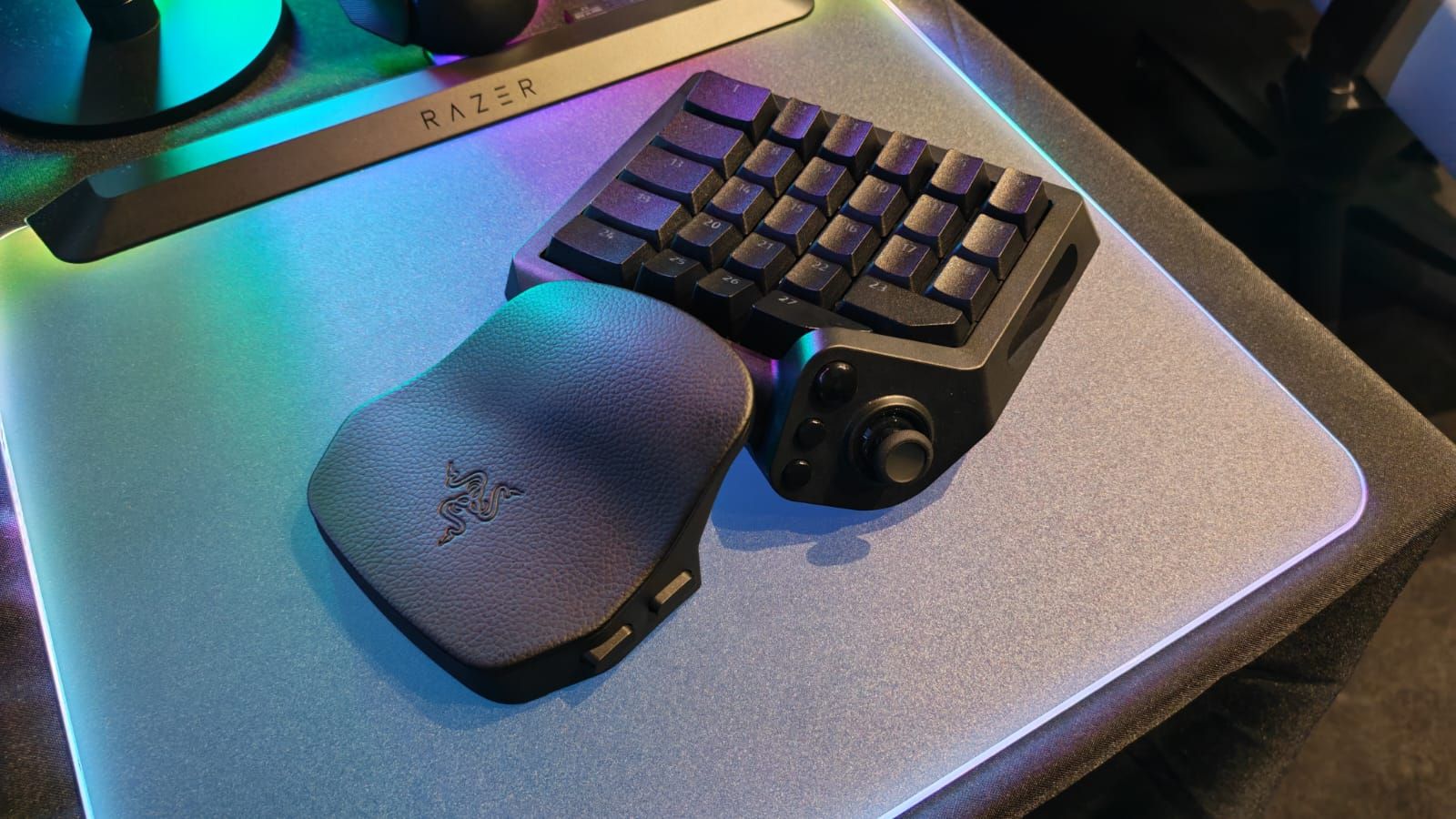

Razer’s new gaming keypad adds Gen-2 analog optical switches, 8000Hz HyperPolling, a TMR thumbstick, and 31 programmable controls. The harder question is whether competitive PC players need a $199.99 keypad.
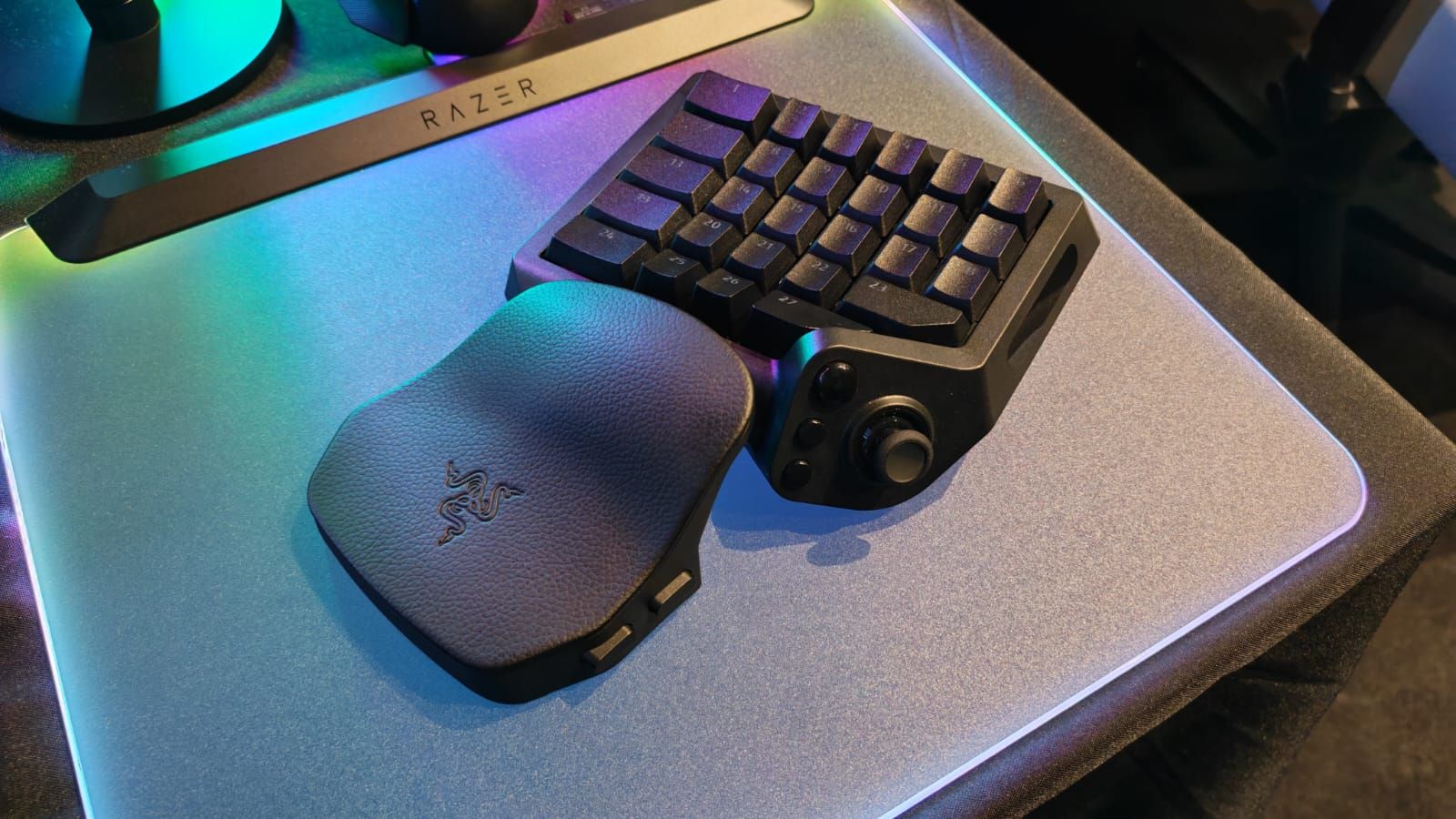
Image: gamesradar.com
Razer brings its flagship keyboard tech to a $199.99 keypad
Razer has announced the Razer Tartarus V2 Pro, a new one-handed gaming keypad that puts Gen-2 analog optical switches and 8000Hz HyperPolling into the Tartarus line. Razer’s own product page lists the device starting at US$199.99, while Wolf’s Gaming Blog reports launch pricing of £199.99, $199.99, and €219.99. Razer’s store page also says launch-week buyers can receive US$30 in Razer Store Credit.
That price is the tension point. A gaming keypad is a specialist tool, and the Tartarus V2 Pro is being pitched by Razer at MMO and FPS players who want dense, programmable control under one hand while the mouse stays responsible for aim. The feature list is aggressive: 31 programmable controls, a full-sized anti-drift TMR thumbstick, an adjustable wrist rest, textured doubleshot PBT keycaps, onboard profiles, Razer Synapse configuration, Rapid Trigger, Snap Tap, Snap Flex, Dynamic Keystroke, and true 8000Hz HyperPolling.
For competitive PC players, the question is not whether the spec sheet is stacked. It is. The question is whether those additions solve a real input problem in your game, or whether the Razer Tartarus V2 Pro price pushes it into luxury territory for players who already have a rapid-trigger keyboard and a good mouse.
The analog optical switches are the real upgrade over the standard V2
Razer says the Tartarus V2 Pro uses Razer Analog Optical Switches Gen-2 with adjustable actuation from 0.1mm to 4.0mm. Rapid Trigger sensitivity can also be set as low as 0.1mm, according to Razer’s newsroom and the product listing. In plain shooter terms, that means a key can be set to register on a feather-light press, then reset with a tiny upward movement rather than waiting for a fixed reset point.
That matters most for repeated movement and ability inputs. Counter-strafing, jiggle peeking, crouch spamming, dodging, and fast ability cycling all benefit from clean press and release behavior. Razer’s store page specifically markets the switches around Rapid Trigger, adjustable actuation, and a 40g actuation force, with the 40g claim tied to the factory default 2.0mm actuation point.
This is also where the product name needs context. Wolf’s Gaming Blog notes that the older Tartarus Pro, released after the 2017 Tartarus V2, already introduced analog optical switches to the line. So the V2 Pro is not the first Tartarus with analog optical keys. The shift here is Gen-2 switch hardware with a wider listed actuation range than the older Tartarus Pro’s 1.5mm to 3.6mm range cited by Wolf’s Gaming Blog from Razer’s older product information, plus the broader control stack around polling, thumbstick input, and onboard adjustment.
Razer says each switch is individually lubricated, seated in a dense foam layer, and rated for up to 100 million keystrokes. Those are manufacturer claims, not independent durability testing, but they do show where Razer is positioning the device: less like a side accessory, and more like a premium control deck built for daily use.
8000Hz HyperPolling is built for latency chasers, but it is not a free win
The headline spec is 8000Hz HyperPolling. Razer says that is eight times faster than the 1000Hz polling rate commonly used by gaming peripherals, and its newsroom frames the Tartarus V2 Pro as bringing true 8000Hz HyperPolling to a dedicated keypad for the first time. Invision Community also reports the same 8000Hz support and ties it to Razer’s Advanced Input Control features.
For ranked shooters, higher polling can reduce the time between device input reports, but the sources provided do not include independent latency measurements, game-by-game testing, or performance data against a 1000Hz keypad. That distinction matters. A faster polling rate on the keypad side does not automatically translate into a measurable improvement in every game, on every PC, or for every player. Your monitor refresh rate, frame pacing, game engine input handling, and personal consistency all sit between a hardware claim and an actual duel won.
The more practical competitive feature may be the combination of Rapid Trigger with Razer’s input-control options. Razer’s listing names Snap Flex, Snap Tap, and Dynamic Keystroke. The product page says Snap Flex can trigger actions on key release and is off by default, with toggling handled through Razer Synapse. Invision Community reports that Snap Tap, Snap Flex, and Dynamic Keystroke are meant to give players more control over how inputs are registered, particularly in competitive games.
That is powerful territory, and it is also where serious players should slow down. If you compete in ladders, leagues, collegiate play, or LAN events, check the rules for your game and tournament before leaning on input-priority or multi-action features. The sources confirm the features exist and can alter input behavior. They do not confirm universal competitive acceptance.
The TMR thumbstick is the biggest change for players who hate WASD
The Tartarus V2 Pro replaces the older thumb-control approach with a full-sized TMR thumbstick. Razer describes it as anti-drift, drawn from its controller work, and useful for radial menus or precise in-game inputs. Wolf’s Gaming Blog reports that older Tartarus models used an eight-way directional thumbpad, while the V2 Pro uses a full-sized TMR analog stick that can provide variable movement in supported games, behave like a four-way or eight-way D-pad, and ship with two additional caps of different heights.
That gives the Razer gaming keypad a clearer identity. For MMO players, the 31 programmable controls can cover ability bars, macros, profession mechanics, menus, and secondary commands. Razer’s own store page includes a Guild Wars 2 team quote focused on keeping skills within reach and using Hypershift for an additional assignment layer.
For FPS players, the thumbstick is more divisive. Analog movement on the left hand sounds attractive if you want controller-like movement paired with mouse aim, but support is game-dependent. Gagadget describes TMR analog movement as useful for games that support variable speed or directional input beyond standard on/off keyboard movement. If your main shooter treats movement as digital WASD anyway, the thumbstick may end up serving better as a D-pad, ping wheel, utility selector, or radial menu tool rather than a true movement upgrade.
The confirmed control count is also worth reading carefully. Razer lists 31 programmable controls. Wolf’s Gaming Blog points out that older models were advertised with 32 programmable inputs, so the improvement here is not raw button count. The upgrade is in the type of controls, the analog behavior, the onboard profiles, the thumbstick, and the switch technology.
The wrist rest and onboard tuning answer old keypad pain points
A one-handed keypad lives or dies on comfort. If the angle is wrong, it does not matter how fast the switches are. Razer says the Tartarus V2 Pro has a fully adjustable ergonomic wrist rest that can slide out and rotate left and right. Invision Community reports the same sliding and rotating design, describing it as a move away from forcing players into one fixed wrist position.
That is a meaningful change for long sessions. Competitive players usually talk first about polling and actuation, but hand position decides whether a device stays on the desk after the honeymoon. Wolf’s Gaming Blog contrasts the new wrist rest with the older Tartarus V2’s two-position palm rest, giving the V2 Pro more room to fit different hand sizes and desk angles.
Configuration also looks less locked to software than some Razer peripherals. Invision Community reports that actuation and Rapid Trigger settings can be adjusted directly on the device using an onboard LED array. Razer still uses Synapse for deeper setup, including keymaps and features such as Snap Flex, but quick actuation changes without opening software are valuable if you swap between an MMO, a tactical shooter, and a movement-heavy arena game.
Razer says users can configure up to 24 keymaps across three onboard profiles. For players who live in one game, that may be overkill. For players who rotate between World of Warcraft, Guild Wars 2, Warzone, Valorant-style tactical shooters, and productivity macros, it gives the keypad a stronger reason to stay plugged in.
Who should consider buying, and who should wait
The Tartarus V2 Pro is available now through Razer.com, RazerStores, and selected or authorized retailers, according to Razer’s newsroom and reports from Wolf’s Gaming Blog and Gagadget. The Razer Tartarus V2 Pro price starts at US$199.99 on Razer’s US store page, with UK and EU pricing reported at £199.99 and €219.99 by Wolf’s Gaming Blog.
If you mainly play MMOs, action RPGs, MOBAs, sims, or shooters with heavy ability management, the case is strongest. Thirty-one programmable controls, Hypershift support, onboard profiles, analog optical switches, and a thumbstick can clean up awkward keyboard reaches. If your left hand is constantly leaving movement keys to hit cooldowns, pings, grenades, mount binds, push-to-talk, or radial menus, this is the exact problem a Razer gaming keypad is built to solve.
If you are a pure FPS player on a good rapid-trigger keyboard, the case is narrower. 8000Hz HyperPolling and analog optical switches are serious competitive specs, but the provided sources do not prove that this keypad will make you faster than a modern high-end keyboard. The value depends on whether the form factor improves your movement discipline and bind access. If it forces a relearn without giving you better control, it can slow you down before it speeds you up.
My read: the Tartarus V2 Pro makes the most sense for competitive PC players who already know they like one-handed keypads, or who have a specific bind problem a keyboard is failing to solve. It is less convincing as an impulse upgrade for someone chasing lower latency alone. At $199.99, you should be buying a control layout advantage, not a spec sheet trophy.