
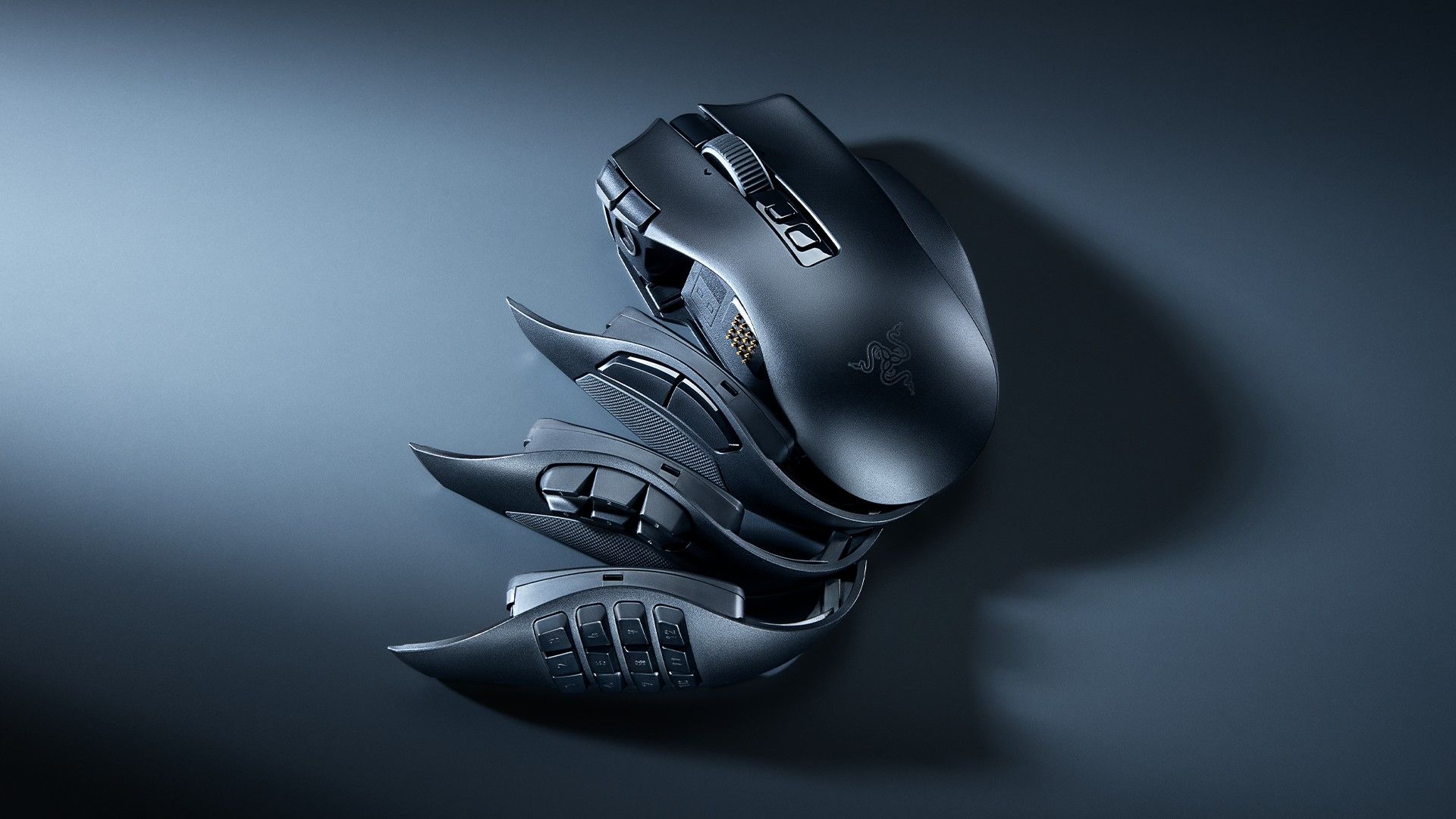

Razer has announced the Naga V3 Pro, a wireless MMO gaming mouse built around three magnetic side plates, up to 23 programmable buttons, a 50K sensor, long battery life, and productivity-friendly scroll modes.
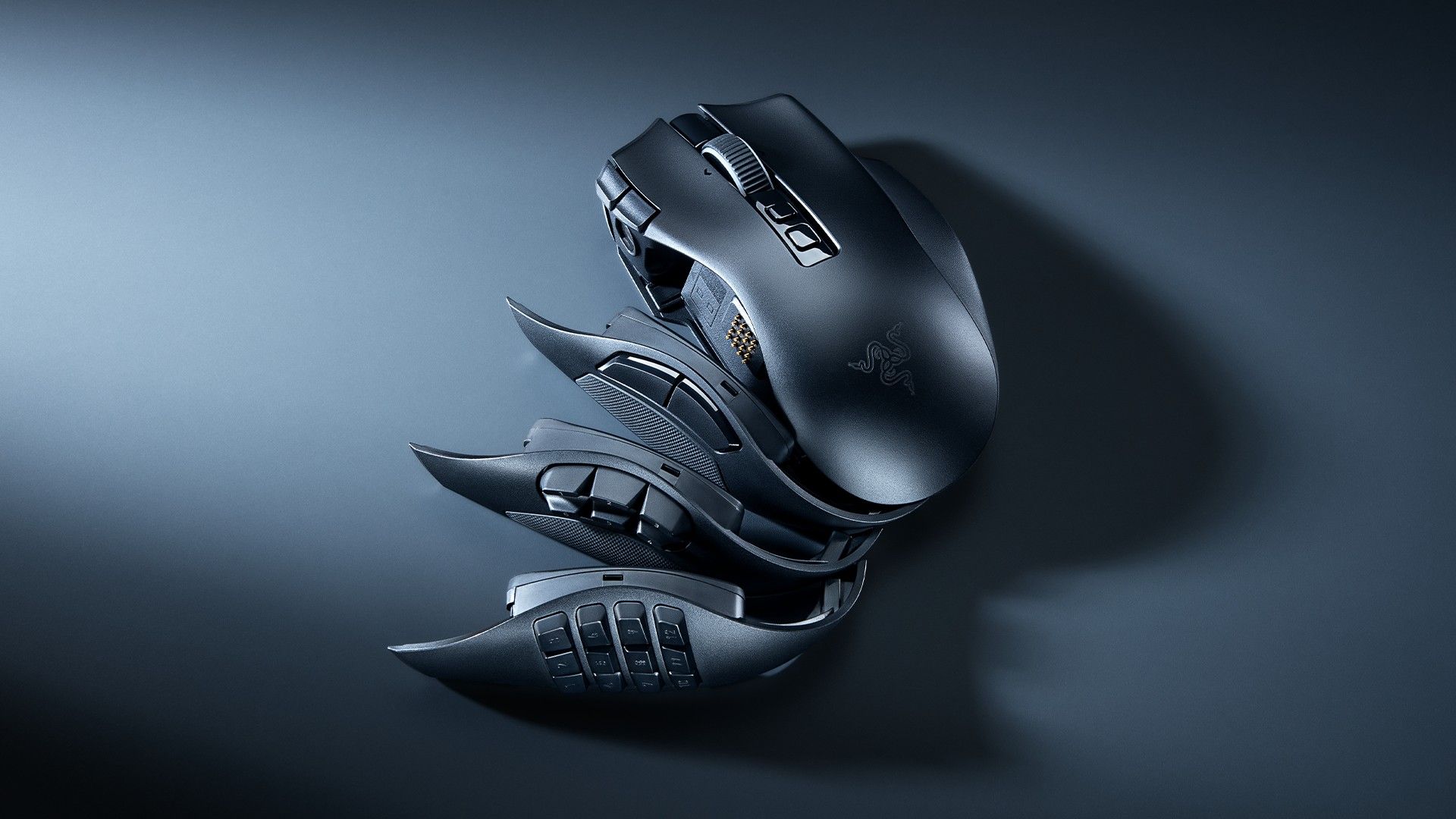
Image: gamesradar.com
Razer’s new Naga is trying to solve the one-mouse problem
Razer has announced the Razer Naga V3 Pro, the latest version of its long-running MMO gaming mouse, and the headline change is not a single spec bump. According to Razer’s official product page and its Games Press announcement, the mouse ships with three magnetic swappable side plates that change its thumb-button layout for different genres: a 12-button grid for MMOs, a 6-button layout for MOBAs and battle royale games, and a 2-button layout for FPS games and everyday PC use.
That is the real tension in the Naga V3 Pro. MMO mice have always won by maximizing inputs, but modern PC players often rotate between games with very different control demands. A 12-button thumb grid can be excellent for World of Warcraft-style rotations, Guild Wars 2 utility bars, or Final Fantasy XIV hotbars, then feel crowded in a shooter where grip stability and simple weapon inputs matter more. Razer’s answer is a swappable side plates mouse that keeps the Naga’s right-handed ergonomic shell while letting the control surface change.
Razer says the plates attach magnetically and can be changed in seconds without tools. Invision Community, reporting on the announcement, describes the Naga V3 Pro as a continuation of the Naga line’s familiar ergonomic design, now widened into a mouse intended for MMOs, MOBAs, FPS games, and everyday PC use. Games Press dates the announcement for August 11, 2026, and quotes Barrie Ooi, Razer’s Head of PC Gaming, saying the V3 Pro responds to a community that wanted “one mouse to adapt to every genre they play.”
The side plates are really about input economy
For MMO players, the 12-button side plate is the conservative choice and still the reason the Naga exists. Razer’s own listing describes the 12-button plate as inspired by a classic T9 phone keypad, meant to put skills, macros, and mounts within thumb reach. The company says the Naga series dates back to 2009, when the 12-button thumb grid became its defining MMO feature.
The practical gain is input economy. In an MMO, the player’s keyboard hand is already handling movement, modifiers, targeting, chat habits, and encounter-specific mechanics. Moving part of the action bar to the mouse can reduce awkward reaches and keep movement cleaner during high-pressure phases. Razer’s official page uses Guild Wars 2 examples, including weapon skills, healing skills, utility skills, elite skills, weapon swap, dodge, autorun, target selection, and profile changes. That is marketing copy, but it illustrates the intended use case clearly: move recurring combat and utility actions to thumb inputs so the keyboard hand has fewer competing jobs.
The 6-button side plate is where the V3 Pro becomes more interesting for players outside pure MMO use. Razer and Invision position it for MOBAs and battle royale games. Six thumb inputs can cover item slots, pings, camera controls, push-to-talk, inventory actions, or ability modifiers without turning the entire left side of the mouse into a dense keypad. For strategy-minded players, that matters because execution errors are often born from overloaded binds, especially in games where map awareness and rapid pings sit beside combat mechanics.
The 2-button plate is the concession to simplicity. Razer pitches it for FPS and everyday use, which is sensible as far as grip and accidental-input management go. It does not turn the Naga V3 Pro into an ultralight esports mouse, and the provided source material does not claim that it does. Impulse Gamer reports the mouse at 117 grams, which places it in a very different category from stripped-down competitive FPS mice. The 2-button plate is better understood as a way to make a feature-rich MMO mouse less intrusive when the game does not reward a wall of thumb binds.
Buttons, profiles, and the return of the ring-finger control
Razer’s official page says the Naga V3 Pro supports up to 23 programmable buttons. That figure depends on the configuration and software setup, but the broad point is confirmed across the announcement material: this is a mouse built for players who want to move commands, macros, modifiers, and DPI shifts onto the mouse itself.
Two new quick-access edge buttons sit beside the left mouse button, according to Razer’s listing, Games Press, and Invision Community. Razer frames them as DPI controls for switching between aiming and map navigation. In practice, those buttons could matter most in games where sensitivity changes are useful but reaching for a keyboard bind is disruptive. The key question for buyers will be placement. Extra top-edge buttons are valuable only if they can be hit deliberately without disturbing primary clicks, and the provided source material confirms the feature but does not include long-term testing on misclick risk.
The lockable ring-finger button is a more revealing design decision. Invision Community and Games Press both state that the button was removed from the Naga V2 Pro because of accidental-click concerns, and that it returns on the Naga V3 Pro with a physical lock so players can enable or disable it. That is a small hardware choice with a large usability implication. A ring-finger input can be a powerful modifier, especially for Hypershift-style layer switching, but it is also exactly the kind of input that can betray you during long raid pulls or tense fights if the actuation is too easy.
Razer’s official page quotes the Guild Wars 2 Team praising Hypershift because it “effectively doubles what each button can do” and places that function at the ring finger. Treat that as a partner-facing endorsement rather than independent testing, but it explains why Razer brought the control back with a lock. The company wants the extra layer without repeating the accidental-click problem that shaped the previous model.
For players who move between a desktop, laptop, and tournament or LAN setup, onboard storage is another important spec. Invision Community reports that the Naga V3 Pro can save up to five onboard memory profiles for custom layouts, macros, and DPI settings. That matters because a high-button mouse becomes far less useful if its bindings disappear whenever Synapse is unavailable or a second PC is used.
The 50K sensor is headroom, not a command to play at 50,000 DPI
The Razer Naga V3 Pro specs discussion will inevitably orbit the sensor number. Impulse Gamer reports that the mouse uses the Razer Focus Pro 50K Optical Sensor Gen-3, rated for 50,000 DPI, 930 IPS, and 90G acceleration. The same review source says the mouse uses Razer Optical Mouse Switches Gen-4 with light-based actuation and a 100 million click lifespan. The announcement material supplied by Razer and Games Press confirms upgraded performance, while Impulse Gamer provides the specific sensor, speed, acceleration, switch, and weight figures available in the source set.
The practical context is important: almost nobody should read “Razer 50K sensor” as advice to play at 50,000 DPI. MMO and MOBA players commonly value consistency, comfort, and bind access over extreme sensitivity. FPS players usually tune effective DPI around muscle memory and desk space rather than the highest possible sensor setting. The value of a high-end sensor is headroom, tracking stability, and the confidence that the sensor will not be the weak point when using different surfaces, different DPI stages, or rapid movement.
That is especially relevant for a multi-genre mouse. A player might use a lower, stable DPI for aiming, a higher stage for navigating large MMO maps or ultrawide desktop space, and a separate profile for productivity. Razer’s new edge buttons are specifically positioned for instant DPI shifts, and the onboard profile support gives those changes a place to live. The sensor upgrade and the swappable plates are therefore connected. One changes the physical input layout; the other gives those layouts enough tracking range to support several use cases without treating every game like the same control problem.
There is still a limit to how much a spec sheet can prove. The provided sources do not include GameLoop hands-on testing, sensor latency measurements, or independent polling data. For now, the confirmed story is that Razer is pairing its most adaptable Naga shell with a very high-resolution optical sensor and updated switches, while the real-world verdict on feel, click tuning, and competitive performance will depend on testing.
The scroll wheel may be the productivity feature hiding in plain sight
Razer’s HyperScroll Tilt Wheel Gen-2 is one of the more practical upgrades because it affects gaming and work use alike. Invision Community reports four scroll behaviors: Standard Tactile mode with a 24-step notched feel, Precision Tactile mode with 48 steps, Free-Spin mode for faster scrolling, and Smart-Reel mode that automatically switches between tactile and free-spin depending on scroll speed. Razer says these settings can be adjusted through Razer Synapse.
In games, the 48-step Precision Tactile mode is the strategic play. Cycling through abilities, weapons, inventory slots, or UI menus benefits from tighter scroll granularity when overshooting is costly. In productivity, the same logic applies to spreadsheets, timelines, long documents, and code. Impulse Gamer’s review text makes a similar point, describing the tighter 48-step mode as useful for dense code and contracts, while Free-Spin helps with long feeds and email threads.
That dual-use case fits the Naga V3 Pro’s broader pitch better than raw DPI does. A mouse with 12 thumb buttons can look excessive on a work desk, but profiles, macros, scroll modes, and Bluetooth battery life make it more credible as a daily driver for people who live in both MMOs and productivity software. The danger is software dependence. Razer Synapse is where scroll and customization settings are adjusted, according to Invision Community, so buyers who prefer driver-light setups should consider how much of the mouse’s value relies on Razer’s software environment.
Battery life, charging, and the availability picture
Invision Community reports that the Naga V3 Pro uses Razer HyperSpeed Wireless and is rated for up to 155 hours of battery life on that connection. The same source says battery life rises to up to 280 hours over Bluetooth. The mouse can also be used over USB Type-C while charging, so a dead battery does not have to end a session.
Those figures point to two different usage profiles. HyperSpeed Wireless is the gaming mode, aimed at lower-latency play. Bluetooth is the endurance mode, better suited for general desktop work, laptop use, or travel. For MMO and MOBA players who might spend long evenings in raids, ranked queues, crafting loops, or market management, the key benefit is less frequent charging rather than a headline number in isolation.
Razer’s official US product page is live and includes an add-to-cart promotion in the provided source text, which indicates a public storefront listing rather than a distant teaser. Invision also mentions additional charging options through the Razer HyperFlux V2 Charging System, and Impulse Gamer reviewed the Naga V3 Pro paired with HyperFlux V2. The supplied sources do not include a confirmed MSRP in the accessible text, even though a Windows Central headline references price and where to find one. Without the actual price in the provided source material, the safer guidance is to verify current regional pricing directly on Razer’s store or authorized retailers before deciding whether the V3 Pro makes sense over older Naga models.
Who should consider the Razer Naga V3 Pro first
The strongest fit is the MMO player who also plays other genres and does not want to maintain separate mice for each one. If your weekly rotation includes raids, MOBAs, battle royale sessions, and general PC work, the Naga V3 Pro’s three plates solve a real control-layout problem. The 12-button grid preserves the Naga’s classic MMO strength, the 6-button plate gives MOBAs and battle royale games a cleaner command surface, and the 2-button plate makes the mouse less busy for shooters and normal desktop use.
Productivity-heavy users are also part of the intended audience, even if Razer leads with gaming. Five onboard profiles, programmable buttons, Bluetooth endurance, USB-C charging, and multiple scroll modes give the mouse a credible role in document work, spreadsheets, macros, and app shortcuts. That said, the value depends on whether you actually build and maintain those profiles. A high-button mouse without deliberate binds becomes expensive desk furniture.
FPS-first players should be more cautious. The 2-button plate reduces clutter, and the 50K sensor gives plenty of tracking headroom, but the Naga V3 Pro remains a right-handed ergonomic multi-button mouse with reported 117-gram weight from Impulse Gamer. Players chasing the lightest possible competitive FPS setup should wait for dedicated performance testing or compare it against purpose-built FPS mice.
As a strategic upgrade, the Razer Naga V3 Pro is most compelling for players whose control needs change by game, role, or workload. Razer’s confirmed feature set is less about one spectacular number and more about reducing friction when the meta shifts from raid utility bars to MOBA item actives, then to desktop macros the next morning. The open questions are price, long-term plate durability, click feel, Synapse dependence, and whether the lockable ring-finger button truly avoids the accidental-input issue that shaped the Naga V2 Pro. Those are the details buyers should look for in full reviews before treating this as an automatic upgrade.