
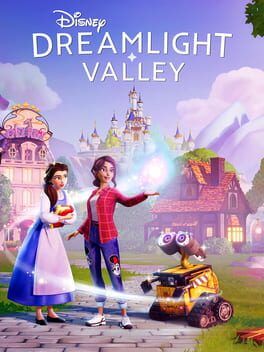
Gameloft’s free Switch 2 upgrade turns Disney Dreamlight Valley into the comfort-food version it always wanted to be on Nintendo hardware, with better performance, higher item limits, and simple paths for existing Switch players to bring their saves along.
Disney Dreamlight Valley has quietly become one of the most reliable comfort games on Switch, the kind of title you boot up to water a few crops, chat with Stitch, then lose an entire evening rearranging your plaza lamps. On the original Nintendo Switch though, that comfort has often come with compromises: unstable performance, long loading times, and a strict 3,000 item limit that choked ambitious decorators.
With the free Nintendo Switch 2 upgrade arriving on March 25, Gameloft is finally giving Disney Dreamlight Valley the kind of technical foundation its cozy-core design deserves. If you already own the game on Switch, you will be able to move up to the Switch 2 edition at no extra cost and enjoy the same valley with more headroom to decorate, smoother performance, and faster loading.
A comfort game that finally feels comfortable on Switch 2
The core of Disney Dreamlight Valley is unchanged on Switch 2. You still wake up in a sleepy village, pull Night Thorns from forgotten paths, and slowly turn a cursed valley into a Disney postcard. The difference is how much smoother everything around that loop feels.
Gameloft has confirmed that the Switch 2 version targets 30 frames per second but hits that target far more consistently than the original hardware. Where the first Switch build could stutter when you sprinted through a cluttered plaza or opened a heavily decorated biome, the extra horsepower in Switch 2 makes that same stroll feel closer to how the game runs on higher-end platforms.
Resolution also sees a bump. The original Switch uses dynamic resolution scaling from a 1080p docked target and often dips to keep performance afloat. On Switch 2, the game holds a higher and more stable image quality, which means cleaner outlines on your character, sharper textures on building facades, and less shimmer on fences, trees, and placed décor. It does not turn Dreamlight Valley into a different game visually, but it makes it easier on the eyes when you are playing for long cozy sessions.
Load times are shorter too. Fast-traveling between biomes, jumping into Scrooge McDuck’s store, or booting into your save after a system sleep all benefit from the faster storage and CPU in the new hardware. On a day-to-day basis, that means fewer breaks in the game’s gentle rhythm and more time actually tending your valley.
The big win: a higher item limit for decorators
For many life-sim fans, the headline feature of the Switch 2 upgrade is not framerate, it is freedom. The item cap on original Switch sits at 3,000 placeable items. That might sound like a lot on paper, but if you are the type who lines every path with custom lighting, fences, and flowerbeds, you hit that wall surprisingly quickly.
On Switch 2, Disney Dreamlight Valley raises the ceiling to 6,000 placeable items in your valley. That matches the higher limit already available on platforms like PC and newer consoles. In practical terms, it lets you:
Fill out wide, themed areas without leaving awkward empty pockets. It is now much easier to dedicate a full biome to a single aesthetic like a Frozen-inspired winter forest or a Pixar pier and still have room for detailed paths and clutter.
Layer detail across your entire map instead of choosing a handful of "showpiece" areas. You can decorate the plaza, the beach, the meadow, and the Forgotten Lands all at once without constantly dismantling old builds to make room.
Take full advantage of themed packs and DLC furniture. If you have been hoarding blueprints and event rewards because you lacked the item budget to place them, Switch 2 gives you permission to finally go wild.
This is where the comfort-food angle really lands. Disney Dreamlight Valley is at its best when you can sink into a decorating trance, experiment, undo, rebuild, and not feel like the system is nudging you to stop. Doubling the item limit nudges in the opposite direction and tells players it is okay to lean into their most extra ideas.
Are there Switch 2 exclusive perks beyond performance and limits?
So far, Gameloft and Nintendo have framed the Switch 2 edition as a technical upgrade rather than a content split. The focus is on visual and performance improvements and that all-important higher item cap.
That means no announced exclusive quests, characters, or DLC that are locked behind the new hardware. If you stay on original Switch, you keep access to the same core content and updates, just with the existing technical constraints.
Where Switch 2 does function as a perk is in how it pulls the Nintendo version closer to parity with other platforms. With a stronger framerate, sharper image quality, and matching item limits, Switch players who primarily treat this as a handheld cozy game finally get much closer to the PC or current-gen console experience while keeping that pick-up-and-play flexibility.
Free upgrade for existing Switch players: how it works
If you already own Disney Dreamlight Valley on Nintendo Switch, you will not need to rebuy the game to benefit from the Switch 2 version. Gameloft has been explicit that this is a free upgrade.
In practice, you can expect it to work like this once the update is live:
On your Switch 2, sign in with the same Nintendo Account that owns Disney Dreamlight Valley on your original Switch.
Visit the Nintendo eShop and search for Disney Dreamlight Valley. The listing should either show as already purchased or offer an upgrade path specific to the Switch 2 edition at no extra cost.
Download the Switch 2 version onto your new system. If you have done a full system-to-system transfer from your old Switch, your local save data may move across automatically. If not, the game’s own cloud save system can bridge the gap.
Your ownership of any paid DLC or expansion content is tied to your Nintendo Account as well, so those entitlements will carry over as long as you are logged into the same account on Switch 2.
Preparing your valley: save transfers and cross-progression
Gameloft has supported cloud saves and cross-progression across platforms since early in Dreamlight Valley’s life. That makes this jump to Switch 2 less intimidating than it might be for other games, but it is still worth preparing.
Here is how to think about it if you are a current Switch player planning a move.
First, make sure your valley is safely in the cloud. From your existing Switch, launch Disney Dreamlight Valley and double-check that you are logged into your Gameloft or in-game account used for cross-progression. Use the in-game options to force a manual save and confirm that the last save timestamp updates. This ensures that the server has your most recent valley state, including layout, friendships, and inventory.
Second, consider a full system transfer if you are moving all your Switch life to Switch 2. Nintendo offers a built-in transfer process during the initial setup of a new Switch 2 that can move user profiles, locally stored saves, and certain settings directly from your old console. If you follow that route, your Disney Dreamlight Valley save should show up just as it was, and the Switch 2 edition will see it when you first launch.
Third, if you prefer a clean install, lean on the game’s cross-save instead. On Switch 2, install Disney Dreamlight Valley, log into the same in-game account you use on your original Switch, and select your existing cloud save when prompted. The game will download your valley data from Gameloft’s servers and let you continue exactly where you left off, now with the higher performance and item limit.
If you have also been dabbling on other platforms such as PC or PlayStation, remember that your progression is tied to your Gameloft account, not the specific console. That makes this a good moment to pick your ideal "main" platform for decorating. Switch 2 becomes a much more viable candidate now that its item limit matches the rest.
Practical tips for getting ready before March 25
If you are counting down to the Switch 2 upgrade, a little prep on your current Switch can make the transition smoother.
Clean up any half-finished builds. The existing 3,000 item limit can make it tempting to leave old areas partially deconstructed. Before you move to Switch 2, consider tidying up big projects or removing temporary clutter so that when the limit doubles, you can immediately start expanding rather than fixing.
Organize your storage. With more room to place items out in the world, you may find you use your chests and storage clusters differently. Sorting out duplicates and junk now will make it easier to grab the right themed items for your first big Switch 2 makeover.
Confirm your account details. Double-check which email or login you used for your Gameloft account, and ensure any two-factor authentication or password resets are up to date. The upgrade window is not when you want to get locked out of your cloud save.
Schedule a "grand reopening" decorating session. Since item caps often dictate how players structure their valleys, this upgrade can be a natural moment to revisit your layout. You might finally connect paths between biomes the way you originally imagined or create denser town centers that felt impossible on the original cap.
Why this upgrade matters for cozy Switch players
Disney Dreamlight Valley has always read like a love letter to fans who see Animal Crossing, Stardew Valley, and The Sims as comfort staples, then ask what would happen if you stirred in Disney and Pixar nostalgia. The Switch 2 upgrade does not reinvent that formula, but it does remove some of the friction that kept the Nintendo version from being the definitive way to play.
With smoother performance, better visuals, shorter loading, and a item limit that finally lets you decorate with abandon, the game gets closer to the fantasy its art and music have always promised. For existing Switch 1 owners, the fact that all of this arrives as a free upgrade deepens the sense that Gameloft understands why Dreamlight Valley works so well as a comforting ritual and wants to keep that ritual intact as players move to new hardware.
If your valley has felt like a favorite blanket that was a little too small, the Switch 2 edition is the moment it finally gets properly sized. Same cozy fabric, same familiar patterns, just more room to wrap yourself up in it.