
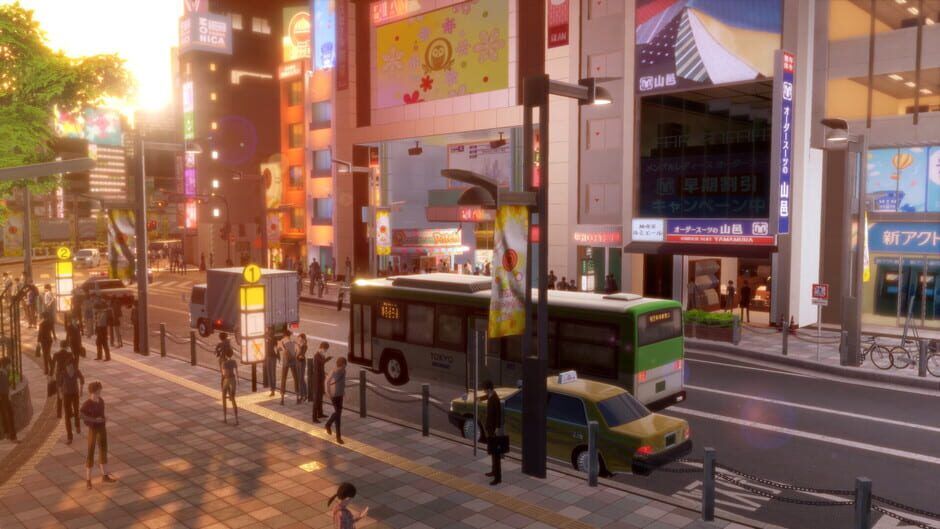
A detailed look at Digimon Story: Time Stranger’s resolution and frame rate on Nintendo Switch versus Switch 2, who should wait for the stronger version, and whether the original Switch edition still holds up for portable JRPG fans.
Bandai Namco has finally broken down how Digimon Story: Time Stranger runs on Nintendo’s current Switch hardware versus the upcoming Switch 2, and the gap is bigger than a simple bump in pixel count. For JRPG fans eyeing the game’s mix of creature raising and story-heavy dungeon crawling, your choice of platform will directly shape how smooth and sharp that adventure feels.
Resolution and frame rate on Switch 2
On Switch 2, Time Stranger offers two distinct visual modes that target different priorities.
Performance Mode is built for snappy combat and camera movement. It runs at 1080p with a target of 60 frames per second. That higher frame rate helps battles feel more responsive, makes camera pans smoother during exploration, and keeps UI animations crisp when you are swapping skills or cycling through party members.
Quality Mode is where Switch 2 leans on its extra horsepower. Docked, the game pushes up to 4K resolution, dropping its target to 30 FPS. In handheld, Quality Mode tops out at 1080p while still aiming for 30 FPS. This mode also enables HDR support, which is exclusive to Switch 2. On a compatible TV, you can expect brighter, more saturated attacks, deeper contrast in darker dungeons, and slightly more lifelike lighting in cutscenes and the hub town.
In both modes, the artwork and asset quality remain the same, so the difference comes from clarity and motion. Performance Mode trades some sharpness compared to native 4K for a fluid 60 FPS feel, while Quality Mode makes character outlines, environment details, and text look cleaner, especially on large screens.
Resolution and frame rate on the original Switch
The original Nintendo Switch version of Digimon Story: Time Stranger is much simpler. There is a single graphics profile and no toggle.
Docked play runs at 1080p, while handheld mode hits 720p. In either case, the game targets 30 FPS. There is no HDR support and no 60 FPS option. For a turn based JRPG, 30 FPS is not a deal breaker, but it does mean that menu transitions, camera swings and flashy attack sequences will not have the same smoothness that Switch 2 players see in Performance Mode.
Visually, the original Switch edition still carries the same core art direction. Character models, Digimon designs and UI are identical, and environments retain their structure and layout. The downgrade shows up in clarity and motion. At 720p handheld, fine details in Digimon textures and background geometry soften, and distant elements can look slightly muddier than they do at 1080p or 4K. On a big TV, 1080p at 30 FPS is serviceable but not particularly sharp by modern standards.
Side by side: how big is the real world difference?
Side by side footage paints a picture of two versions that look closely related but feel different to play.
In combat, Switch 2’s Performance Mode gives skill animations more snap and reduces judder when the camera does sweeping moves during big ultimate attacks. The higher frame rate makes it easier on the eyes during long grinding sessions with lots of transitions between fights and menus. Walking through city hubs and dungeon corridors, character motion feels more responsive and camera control is smoother, which is especially noticeable if you are sensitive to stutter.
Quality Mode on Switch 2 narrows the feel gap in exchange for image quality. At 4K, the art pops: UI text remains razor sharp, outlines around Digimon stay clean, and foliage or mechanical details in backgrounds hold up better at a distance. Lighting benefits from HDR, with spell effects and world lighting taking on more punch on compatible displays.
The original Switch holds its own in terms of style. It presents the same layouts and models without glaring cutbacks in geometry, and during story scenes it still sells the mood of each location. Where it falls behind is subtle but constant. Texture edges shimmer a bit more, shadows look flatter, and the lower frame rate is an ever present cap on how fluid the game can feel.
Who should wait for the Switch 2 version?
If you mostly play docked on a big TV, the Switch 2 version is clearly the better fit. Players who care about image sharpness and smoother gameplay should wait for Switch 2, since both of its modes offer a tangible upgrade.
If you value responsiveness in menus and battles, Performance Mode at 1080p and 60 FPS is the most attractive way to play. The game’s systems encourage constant party tweaking and Digimon management, so the snappier interface on Switch 2 will add up over dozens of hours.
If you own a 4K HDR television and appreciate clean JRPG visuals with colorful particle effects, Quality Mode is compelling. Time Stranger leans heavily on bright skills and high contrast environments that benefit from HDR and higher resolution, and the game’s slower, turn based pacing makes 30 FPS less of a problem during combat.
In short, players who already plan to pick up a Switch 2, who primarily play on a TV, or who are sensitive to frame rate and resolution will want to hold off for that stronger edition.
Is the original Switch version still worth it for portable JRPG fans?
For JRPG fans who care more about portability than pixel counts, the original Switch release remains a perfectly viable option.
Time Stranger is structurally well suited to handheld play. Its loop of short story segments, dungeon delves, and repeatable battles works nicely in 20 to 40 minute sessions. At 720p and 30 FPS in portable mode, the game does not dazzle technically, but its clean character designs, readable UI and bright color palette keep it comfortable to play on the go.
Text boxes and menu labels were designed with handheld readability in mind. Even with the lower resolution, the interface stays clear enough that you can comfortably manage your Digimon roster, skill lists and equipment while commuting or lounging away from a TV. Since gameplay is turn based, minor frame pacing dips are far less disruptive than they would be in a twitch action title.
If the Switch is your only Nintendo platform for the foreseeable future, there is no need to treat the original version as a cut down afterthought. You lose HDR and the option for 60 FPS, and docked play will not match the sharpness or smooth motion of Switch 2. But if your top priority is taking a full scale Digimon Story adventure anywhere, the current Switch hardware still delivers the core experience without major compromises in content.
Which version should you buy?
Choose the Switch 2 version if you are planning to upgrade soon, play largely on a TV, want the option of 60 FPS or 4K with HDR, or are sensitive to stutter and softer image quality.
Stick with the original Switch edition if you primarily play in handheld mode, care more about having a long story driven JRPG in your bag than about graphical features, or do not plan on buying a Switch 2 anytime soon.
Digimon Story: Time Stranger has been built to scale across both devices without sacrificing its systems or story. On Switch 2, it can flex with smoother performance and higher resolution for those who want their Digimon at their sharpest. On the original Switch, it slots neatly into the library of comfort food JRPGs that trade bleeding edge visuals for the ability to grind, fuse and explore wherever you are.